

ClusterVisor feature
Rack diagramming
ClusterVisor makes web-based rack diagramming an easy drag-and-drop experience.
Rack diagramming
ClusterVisor makes web-based rack diagramming an easy drag-and-drop experience. All nodes and devices entered via configuration management can be added to a rack diagram.
Once diagrammed, the resulting image lets you visualize your cluster as it is in the datacenter. With customizable dashboards, you can apply any statistic gathered to the diagram, making it a very visual way to see what is happening on your system, for example a heat map of system temperatures across a rack.
Racks can also be used as a selector to perform actions on specific nodes. For example, you can power down all nodes in rack1, or run other commands a rack at a time.
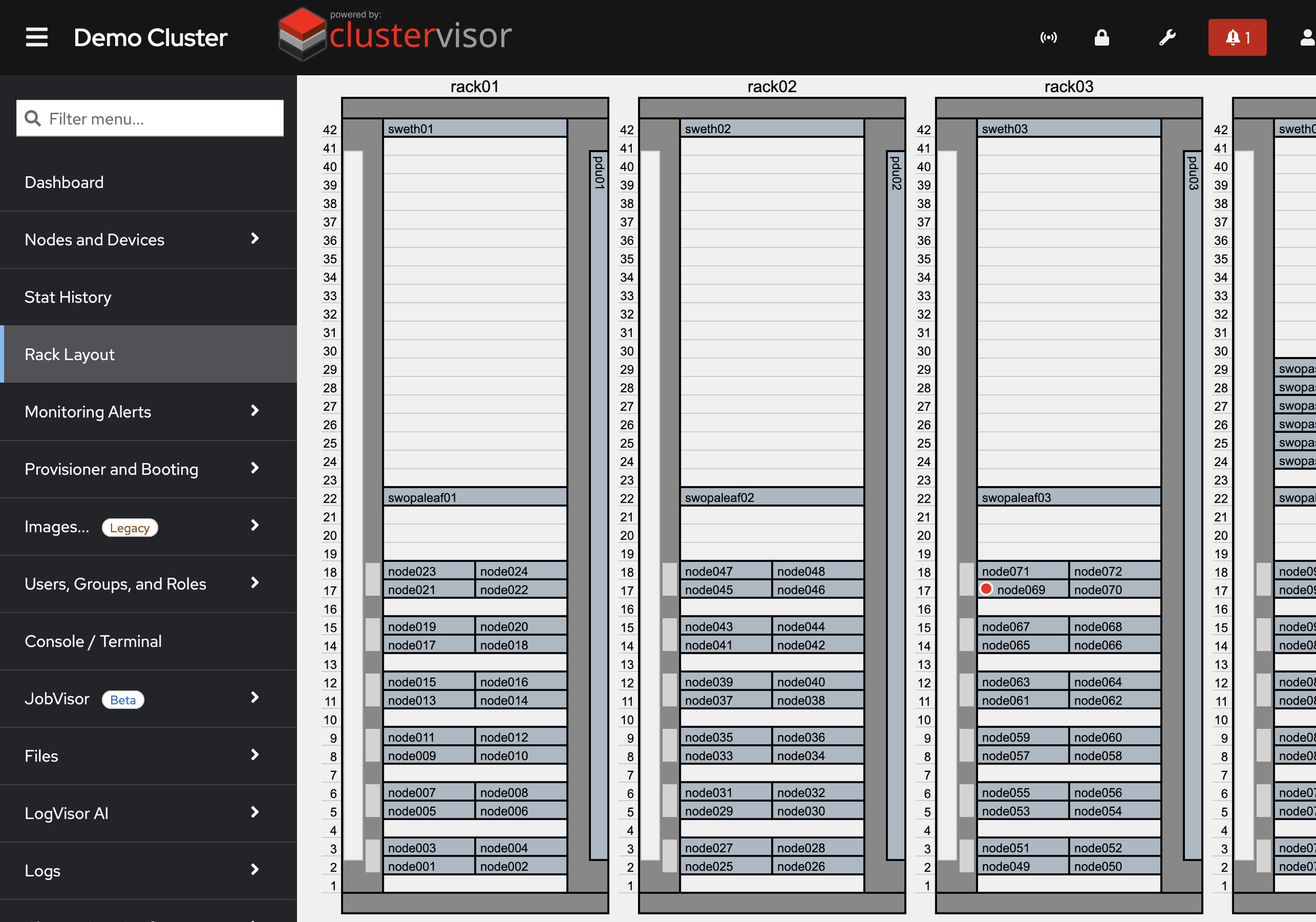
Click the screenshot to enlarge
See it on your cluster.
We’ll walk you through ClusterVisor with one of our HPC/AI engineers.
Request your demoExplore more features.
Monitoring, provisioning, JobVisor, LogVisor AI and more: twelve tools in one platform.
All ClusterVisor features
Engineering the future of HPC and AI
info@advancedclustering.com(866) 802-82223148 Roanoke Road, Kansas City, MO 64111