

ClusterVisor feature
LogVisor AI
LogVisor AI is tightly integrated with ClusterVisor, classifying logs by severity so alerts can be created automatically.
What is LogVisor AI?
LogVisor AI is an artificial intelligence log file analysis tool that is available as part of ClusterVisor.
Linux systems produce a lot of log data, so much that most of it goes unread. While many of those log entries are benign status or debug messages, some of them are very important. With the huge quantity of messages each server produces, it’s very easy for important messages about system problems or security problems to be missed. This problem is compounded on an HPC system with tens to thousands of nodes. It’s the proverbial needle in a haystack.
How do you find the important messages in your logs without spending all day reading every single one? That’s where LogVisor AI can help.
The AI model
Advanced Clustering has taken more than 20 years of experience deploying and supporting customers’ HPC systems to build a custom AI model that categorizes log entries by severity. The model was trained on log files sent by customers to our support teams. ACT engineers went through the painstaking task of categorizing individual log messages with the appropriate severity level: neutral, warning, error or critical. This categorized data is then used to train the AI model, so it can automatically categorize all of your logs for you.
How does it work?
Most HPC clusters set up syslog to push logs into a central place, and ClusterVisor is no exception. Your ClusterVisor appliance or server becomes the central syslog server for all nodes in your cluster. As new syslog entries are received, they are sent through the AI model for inference and severity classification, then stored in our log database. Using the standard ClusterVisor appliance, we can easily run inference on over 2,000 log entries per second.
Integration with ClusterVisor
LogVisor AI is tightly integrated with ClusterVisor, and now that logs are classified with a severity level, alerts can be created automatically. For example, if LogVisor AI classifies a log message on node01 as critical, an alert can be automatically created for node01 with the contents of the critical log. This lets you be notified of problems in your cluster without manually creating rules for every specific condition. It might even find issues you didn’t know existed.
LogVisor AI doesn’t stop at automatic alerting. With the entire cluster’s syslog data in a database, ClusterVisor provides easy-to-use querying and searching that standard text-based log files can’t match. You get full boolean search, plus filtering by AI severity, host, process and more, which makes finding important log entries much easier. This query ability is available both in the ClusterVisor web UI and via command line tools.
Revision filters
While AI log file classification is very helpful, sometimes specific log entries matter only to your organization. LogVisor AI offers a fallback: revision filters, created with a simple text search or regular expression, that classify log entries. For example, if your institution only allows SSH access by key, a log message showing someone logged in with a password could be a critical alert. By creating a custom revision filter, you can elevate this benign message to a critical alert on your system, notifying you of a security problem that might easily get missed.
Model updates
While Advanced Clustering has put a lot of effort into building and training the log classification model to be as accurate as possible, it’s not perfect. New messages will come along that need to be part of the training dataset. To help, LogVisor AI lets you flag incorrectly classified log messages for retraining. These messages can then be automatically sent to Advanced Clustering for training in the next model release.
To keep LogVisor AI current, it regularly checks our servers for new models, then downloads and uses them when available, so your installation gets smarter over time.
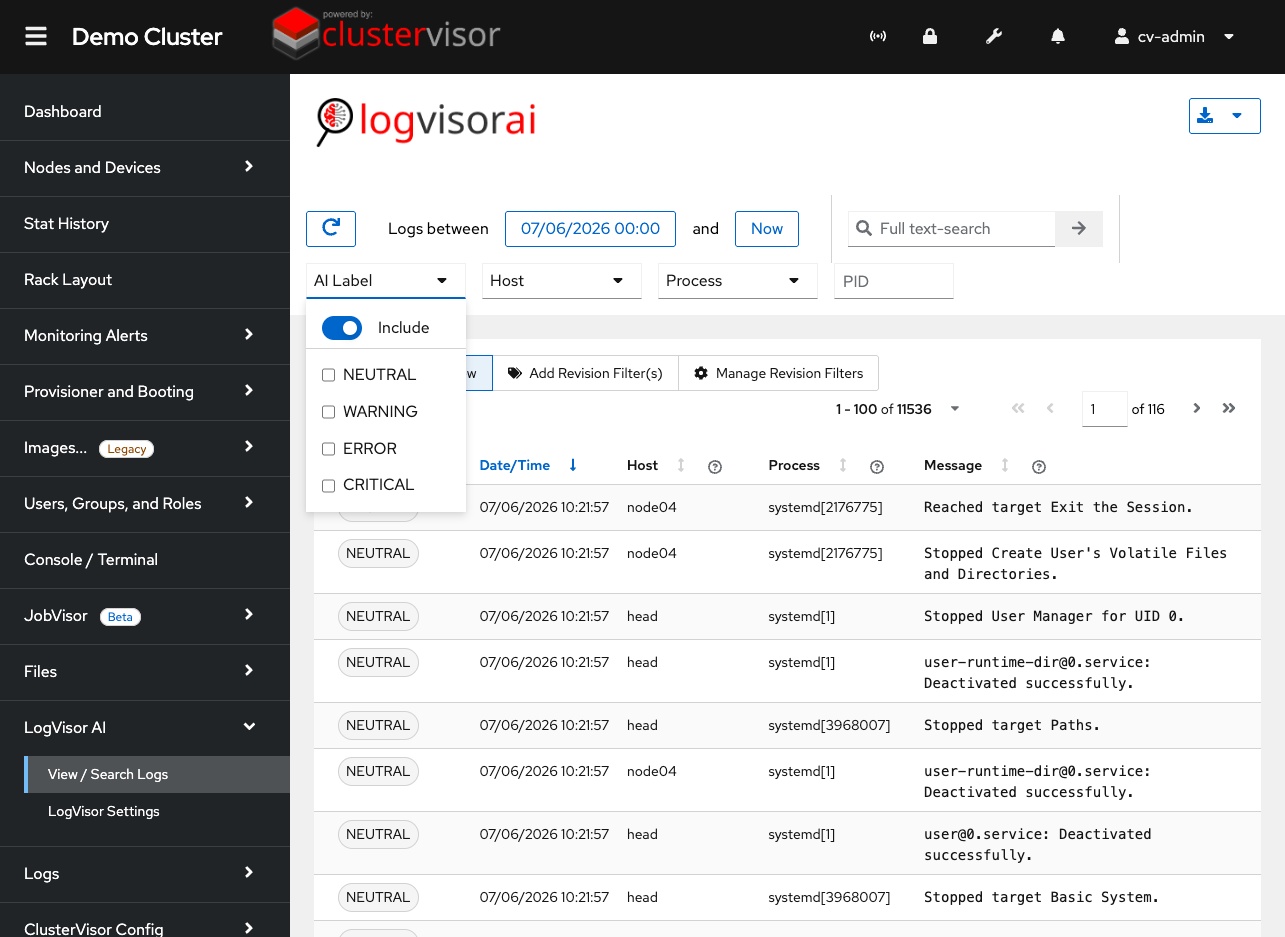
Click the screenshot to enlarge
See it on your cluster.
We’ll walk you through ClusterVisor with one of our HPC/AI engineers.
Request your demoExplore more features.
Monitoring, provisioning, JobVisor, LogVisor AI and more: twelve tools in one platform.
All ClusterVisor features
Engineering the future of HPC and AI
info@advancedclustering.com(866) 802-82223148 Roanoke Road, Kansas City, MO 64111